Migrating from the old portal
Reading time: ~8 minutes · Execution time: 20-40 minutes · Audience: anyone with a dosing pump connected to the old portal (iot.joy-reef.com) — self-built or purchased
The new JoyReef portal is the dosing pump's new home: the old portal stays online, but all new features land only on the new one. This guide takes you across in two steps: you update the dosing pump's firmware and connect it to the new portal. It applies to everyone — whether you built your dosing pump yourself or bought it. No rush: migrate whenever you want.
1. Why migrate
The new JoyReef portal isn't a restyling: it's a brand-new system, and the dosing pump is just one of its components.
- 📊 Dashboard and history: doses, events and charts you can review over time
- 🧪 Full tank integration: the doser talks to sensors, probes and automations (Balling, calcium reactor, KH titration...)
- 🔔 Notifications: alerts when something goes wrong
- 📱 Mobile app and access from any device
- 🔧 Active development: the old portal no longer gets updates, all the work is on the new one
The old firmware can't talk to the new portal: that's why the migration starts with the firmware update.
⚠️ What is NOT migrated automatically: dosing schedules and pump calibration stay on the old system. Before you start, write them down (daily amounts, times, number of doses per channel): you'll re-enter them on the new portal in a few minutes.
2. Before you start
- ✅ Write down your dosing schedules and the calibration data from the old portal (see above)
- ✅ Create an account on the new portal: portal.joy-reef.com. Remember: on the new portal your username is your email, not the old portal username
- ✅ Keep your home WiFi password handy: after the update the dosing pump must be reconfigured
The new firmware is the same file for everyone and can be downloaded freely from the portal.joy-reef.com/usb-flash page (the Dosing pump's "Download .bin" button).
ℹ️ Did you buy the dosing pump (not self-built)? Take a look at section 5: your board will be entitled to the premium unlock in the future, but for now there's nothing different for you to do — the public firmware is enough.
3. Step 1 — update the firmware
Three paths, in order of convenience: try A; if it doesn't work move on to B; C covers every remaining case (and is also the recovery procedure).
Path A — from the browser, no cables
Dosing pumps with the oldest firmware have a hidden update page, reachable from your home browser:
- Find the dosing pump's IP address on your network: open the router's admin page and look among the connected devices for one called
jrdoso(or ESP/Espressif) - Open in your browser:
http://IP-ADDRESS/update(example:http://192.168.1.42/update) - If a page with a firmware upload field appears → you're on the right path. If you get "page not found" or no response → your doser doesn't have this page: move on to path B
- Download the Dosing pump's
.binfrom portal.joy-reef.com/usb-flash ("Download .bin" button) - On the
/updatepage, select the file you just downloaded and confirm - Wait for the upload without closing the page or cutting power: when it's done the doser reboots on its own
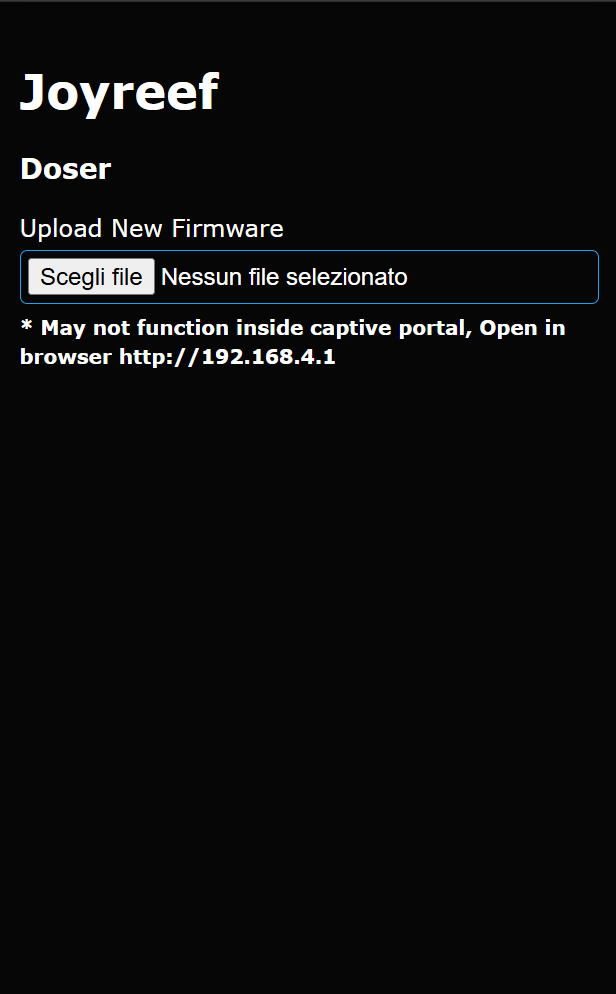
⚠️ Upload ONLY the right file. The
/updatepage performs no checks: it accepts any file. Uploading the wrong firmware (e.g. the Controller's) leaves the board without working firmware — recoverable, but only with a cable (guide 16b). The right file is the Dosing pump.bindownloaded from the portal's /usb-flash page.
When the upload is complete, this message appears and the board reboots on its own:
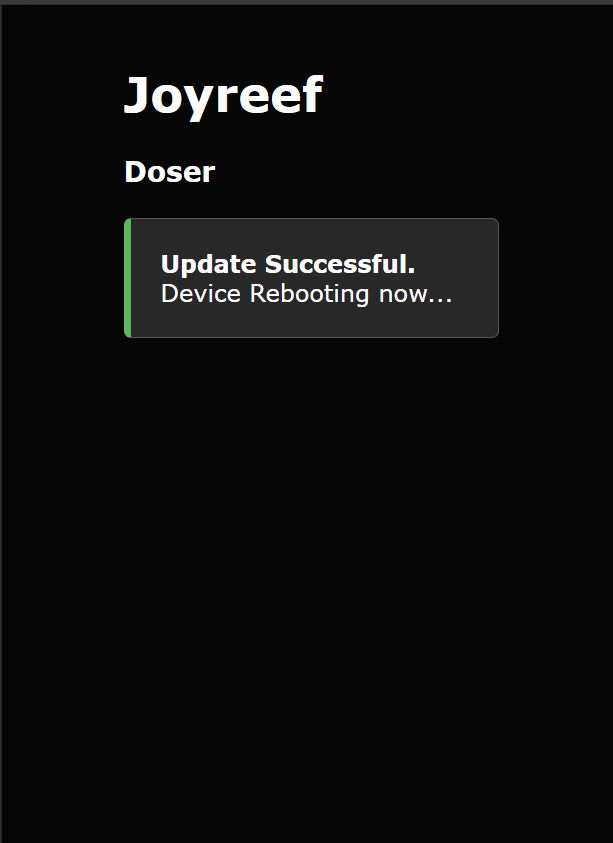
🔁 No reset needed. On its first boot the new firmware recognises the old portal configuration, erases it by itself and restarts once more: the board returns to factory state and is ready to be connected to the new portal (Step 2).
⚠️ Warning: all previous programming will be lost! Doses, calibrations and settings are erased: make sure you've written them down as described in section 2.
Path B — over USB cable
If your board has a USB port: follow guide 16 — Firmware installation over USB. All from the browser, it takes 10 minutes.
Path C — over serial adapter (boards without USB)
If your board has no USB port: you need a CP2102 adapter (a few euros), connected to 4 pins on the board. Follow guide 16b — Flashing with the CP2102 serial adapter.
💡 How do I know which path is mine? You don't need to know in advance: try A (5 minutes, zero risk — if the page doesn't exist, nothing happens). If it doesn't work, look at the board: is there a USB socket? B. None? C.
4. Step 2 — connect the dosing pump to the new portal
After the update the doser restarts "blank": within 30 seconds a WiFi network called joyreef-XXXXXX will appear.
- Follow guide 03b — WiFi connection from section 3: you connect to the
joyreef-XXXXXXnetwork, the configuration portal opens, you enter your home WiFi and your JoyReef account credentials
⚠️ Use your EMAIL as username. On the new portal the username is the email address you registered with: not the username you used on the old portal (iot.joy-reef.com). The password is the new portal one. With the old username the dosing pump will not connect.
- The doser shows up among your devices on the portal
- Configure channels, calibration and dosing schedules with guide 11 — Dosing pumps (this is where you need the data you wrote down at the start)
Done: the migration is complete. From now on the dosing pump lives on the new portal.
5. Did you buy the dosing pump?
If your doser is an original JoyReef board (purchased, not self-built), it is entitled to unlock all premium features, forever and with no subscription, once the portal introduces paid plans.
ℹ️ In beta nothing changes: today all features are open to everyone. Recognition of original boards is for the future — there's no rush.
What do you need to do now? Nothing special. Update the firmware and connect the doser exactly like everyone else, following this guide: the public firmware is perfectly fine.
When the time for paid plans comes, the portal itself will notify you: you'll get a message with the instructions to activate the premium unlock reserved for original boards. No extra step now, no different firmware to install by hand.
💬 Questions about your board's recognition? Write to us via the contacts on the portal: we'll take care of it.
6. Common problems
| Symptom | Solution |
|---|---|
| I can't find the doser among the router's devices | Check it's powered and that the home WiFi is the same as before; some dosers appear as "Espressif" |
http://IP/update doesn't respond |
Your doser doesn't have the page: paths B or C |
Upload via /update interrupted or wrong file |
The board won't restart: recover with guide 16b |
After the update joyreef-XXXXXX doesn't appear |
Power-cycle it; if still nothing → guide 16b (recovery) |
| The doser is online but the schedules are gone | This is expected: schedules don't migrate, re-enter them with guide 11 |
7. Conclusion
Welcome to the new portal. From here on the dosing pump is a first-class citizen of the JoyReef system: if you have a whole tank to manage, the complete path starts from guide 01 — Shopping list; if you only care about the doser, guide 11 is your home.