Energy & Health (Heater, Return Pump, Skimmer Alarms)
Reading time: ~10 minutes · Execution time: ~10 minutes · Audience: anyone who has Tasmota smart plugs with energy monitoring (e.g., Nous A1T) connected to a heater, return pump, and/or skimmer
🔵 Advanced Guide — not part of the 01-08 onboarding path. Requires smart plugs with power measurement (not all Tasmota plugs have it).
1. What you are about to do
Tasmota smart plugs with an energy chip (like the Nous A1T recommended in guide 05) measure the instantaneous power (Watts) consumed by the connected device in real-time. JoyReef can use this reading to notice that something is not working as it should, even before you notice the problem yourself.
Typical examples of silent failures that this feature intercepts:
- ⚠️ The heater is on (red LED, closed contacts) but not actually heating: the internal heating element has burned out. Without energy monitoring, you notice only when the temperature crashes. With monitoring, JoyReef notices in a few minutes (consumption = 0W instead of the expected 200W).
- ⚠️ The return pump has stopped (stuck impeller, burned motor, blackout). A tank without circulation stratifies → unstable temperatures, oxygen levels drop. Without an alert, you notice when you see the sump emptying or the water in the display tank still. With an alert, you know within minutes.
- ⚠️ The skimmer has stopped (clogging, internal pump blackout, overflow bottle). Without an alert, you notice when you see it's no longer foaming. With an alert, you know immediately.
In this guide, you will configure 3 distinct monitorings:
- Heater: alert if it doesn't consume when it should (+ cross-check via temperature increase)
- Return Pump: alert if it stops
- Skimmer: alert if it stops
Plus a maintenance mode (30/60/120 min) to silence alerts when you intentionally turn something off for cleaning/water changes.
⚠️ It ONLY works if your smart plug has an energy measurement chip. If the plug only measures on/off but not Watts, this feature cannot work. The Nous A1T plugs recommended in guide 05 have it; cheaper generic Tasmota plugs often do not.
2. What you need
- ✅ Smart plugs with power measurement (Nous A1T, Athom EU-Plug, Sonoff S31 Lite, etc.) for the devices you want to monitor. Check the plug's technical sheet for "Energy monitoring" or "Power measurement."
- ✅ The smart plugs already configured and assigned to the tank (see guide 05).
- ✅ The physical devices (heater / return pump / skimmer) connected to their respective plugs.
- ✅ A temperature probe in the tank (see guide 04), only if you want to use the heater cross-check.
💡 How to tell if your plug actually measures power: go to Config → Devices, open the plug, and look for the "Energy" tab. If it's there and shows values in Watts (even zero) and kWh, the plug measures. If not, it doesn't.
3. How alerts work
Basic Logic
Each monitored device has 2 parameters:
- Min Watts: the minimum threshold below which you consider the device "not working." Example: for a 200W heater, a threshold of
50Wmeans "if it consumes < 50W, I consider it off." It's set below the nominal power but above "standby power" (some devices consume 1-5W even when "off"). - Stopped Minutes or No power Minutes: how many consecutive minutes the condition must be true before the alert triggers. Example:
5minutes = a brief interruption doesn't trigger an alert, but a persistent anomaly does.
Heater (Double Check)
The heater has an additional check compared to the return pump/skimmer because the most subtle thing that can happen is:
The heater consumes current (heating element apparently intact) but doesn't actually heat (internal scaling, failed thermal contact, internal thermostat probe blocking).
To catch this, JoyReef crosses electrical consumption with the measured temperature increase from the probe:
- No rise minutes: time window (e.g., 30 min)
- Min temp rise °C: minimum expected increase in that window (e.g., 0.3°C)
If in 30 min the heater has consumed power (logically it should have heated) but the T has not risen by at least 0.3°C → "inefficient heater" alert.
Return Pump and Skimmer (Simple)
For these devices, the condition is straightforward: if the plug is "on" (commanded ON) but consumption is below the threshold for N minutes → alert.
Maintenance Mode
When you intentionally turn something off (e.g., cleaning the skimmer, replacing a pump, doing a water change), alerts would trigger as false positives.
Maintenance mode suspends alerts for the individual device for 30, 60, or 120 minutes. After the time expires, alerts automatically become active again. You can also deactivate it manually before it expires.
Where alerts go
Alerts generated by the Energy & Health system appear as:
- Events in the tank timeline (see guide 14)
- Email/push notifications if you have configured notifications (see guide 15)
They do not block any device: they are informative, telling you "look, something isn't right," but the heater remains on, the skimmer isn't accelerated. It's up to you to decide what to do.
4. Step 1 — Open the Energy & Health page
From the portal:
- Left menu → "Energy & Health" (lightning/heart icon) or go to
portal.joy-reef.com/energy-health - The "Energy & Health" page opens.
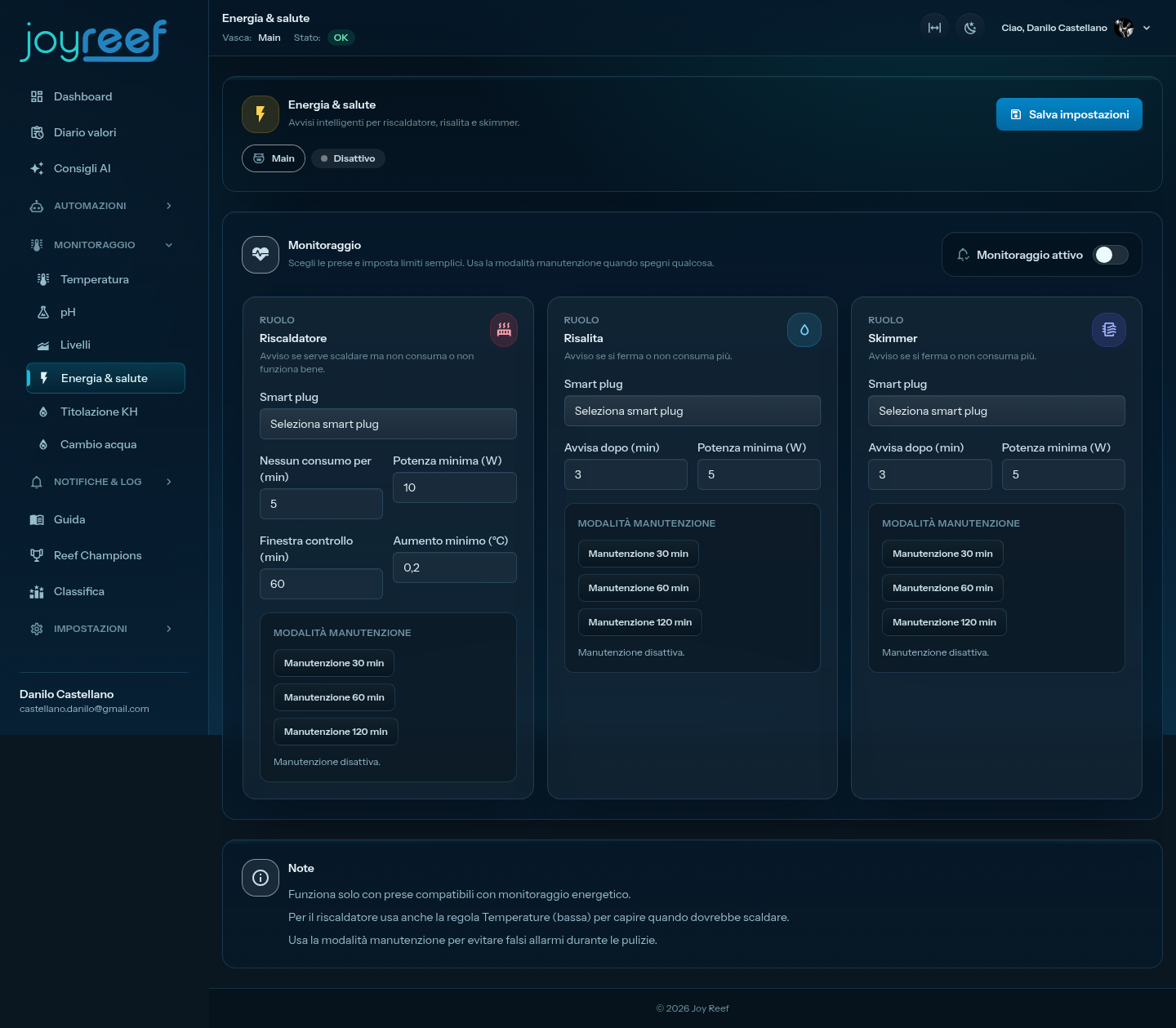
Header with status (Active/Inactive), tank pill, and "Save Settings" button at the top.
You will see 3 cards side by side (or stacked on mobile):
- Heater
- Return Pump
- Skimmer
All initially empty (no plug selected).
5. Step 2 — Configure heater monitoring
In the "Heater" card you find:
Smart plug
In the "Smart plug" menu, select the plug to which you connected the heater (e.g., "Heater" from guide 05).
No consumption for (min)
How many consecutive minutes without consumption before triggering the alert.
Recommended value: 10 (= 10 minutes)
The heater is usually on in cycles (e.g., 5 min ON, 10 min OFF) under the control of the Temperature page. So OFF periods are normal. But 10 consecutive minutes of zero consumption when the temperature is below the threshold means something is wrong.
Minimum power (W)
Below which Wattage to consider the heater "not in operation."
Recommended value: depends on your heater. A good rule of thumb: 30-50% of the nominal power.
| Nominal heater power | Recommended min watts |
|---|---|
| 100W | 40 |
| 200W | 80 |
| 300W | 120 |
| 500W | 200 |
(Set below nominal to account for non-constant consumption; above standby to not confuse "off" with "very low").
Control window (min)
The time window for the cross-check with temperature.
Recommended value: 30 (= 30 min)
Minimum increase (°C)
How much the temperature must have risen in that window for the heater to be considered "actually working."
Recommended value: 0.3 (=0.3°C)
⚠️ This value is a temperature difference (ΔT) and is always expressed in °C, regardless of the unit chosen in your profile: 0.3°C ≈ 0.54°F.
These last two fields together say: "in 30 min, if the heater has consumed power, the T should have risen by at least 0.3°C. If it hasn't happened, it's inefficient."
💡 Very large tanks (>400L net) have high thermal inertia: the expected increase in 30 min could be smaller. Reduce to
0.2°Cor increase the window to45-60 min. Small tanks (<100L) heat up quickly: you can be stricter (0.5°Cin20 min).
🖼️ Image to insert here (Filled Heater card): screenshot of the card with smart plug = "Heater", No power minutes = 10, Min watts = 80, Window = 30, Minimum increase = 0.3.
6. Step 3 — Configure return pump monitoring
In the "Return Pump" card you find 3 fields.
Smart plug
Select the plug to which the return pump is connected.
⚠️ Many return pumps are directly connected to 220V without an intermediate plug because they work 24/7 (they don't need to be turned on/off). To use this feature, you must put a smart plug in the middle: the utility is only monitoring, not turning the pump off.
Notify after (min)
How many consecutive minutes "stopped" before triggering the alert.
Recommended value: 2 (= 2 minutes)
The return pump is critical: an alert must trigger quickly. Typically in 2-3 min without circulation, the sensors in the tank begin to read "stagnant" values (stratification begins).
Minimum power (W)
Below which Wattage to consider "stopped."
Recommended value: 40-60% of the nominal power.
| Return pump | Min watts |
|---|---|
| Eheim Compact 2000 (~25W) | 10 |
| Tunze 5000 (~30W) | 15 |
| Vortech MP10 (~25W) | 10 |
| Generic 50W AC pump | 25 |
🖼️ Image to insert here (Filled Return Pump card): screenshot of the card with smart plug = "Return Pump", Notify after = 2, Min watts = 15.
7. Step 4 — Configure skimmer monitoring
In the "Skimmer" card you find the same 3 fields.
Smart plug
Select the skimmer plug (or rather: the skimmer pump, if the model is separate).
Notify after (min)
Recommended value: 5 (= 5 minutes)
The skimmer is less critical than the return pump: a brief interruption is not urgent. But more than 5 min stopped means a probable blockage or broken pump.
Minimum power (W)
Recommended value: 30-50% of nominal.
| Skimmer | Min watts |
|---|---|
| Bubble Magus Curve 5 (~8W) | 3 |
| Reef Octopus Classic 110 (~16W) | 8 |
| Tunze Comline DOC 9001 (~6W) | 3 |
| Generic ~10W internal skimmer | 4 |
🖼️ Image to insert here (Filled Skimmer card): screenshot of the card with smart plug = "Skimmer", Notify after = 5, Min watts = 4.
8. Step 5 — Activate and save
At the top right of the page, next to the title:
- "Monitoring active" toggle → green
- "Save Settings" button → click
Green confirmation banner "Energy and health settings saved."
From this moment, the system compares the consumption read from the smart plugs with the thresholds you've set in real-time. Alerts (if they trigger) will appear in the event timeline and in notifications.
9. Maintenance Mode
Below each card you find a "Maintenance Mode" section with 4 buttons:
- 30 min Maintenance
- 60 min Maintenance
- 120 min Maintenance
- Deactivate
When to use it
When you intentionally turn off a device for a few minutes and don't want to receive false positive alerts:
- Heater: during tank maintenance, replacement, calibration.
- Return pump: during water changes, cleaning, sump maintenance.
- Skimmer: during cup/bottle cleaning, impeller replacement (a weekly operation!).
How it works
Click one of the 3 buttons (30/60/120 min). Below you'll see a text:
"Maintenance active until 15:30."
For the indicated minutes, alerts for that specific device are automatically suppressed. When the time expires, alerts become active again without you having to do anything. If maintenance ends earlier, you can click "Deactivate" to reactivate alerts immediately.
💡 Use maintenance mode even for regular water changes and cleanings. It costs nothing and avoids receiving 5 email notifications when you've simply disconnected the skimmer to clean it.
🖼️ Image to insert here (Active maintenance mode): screenshot of the Skimmer card with "Maintenance active until 15:30" visible below the 30/60/120 min buttons.
10. If something goes wrong
I don't see Watts in the plug ("Energy" section absent)
Your smart plug does not have an energy measurement chip. Energy & Health features cannot work with this model.
Solutions:
- Replace the plug with a model that measures (Nous A1T, Athom EU-Plug, Sonoff S31 Lite).
- Verify that Tasmota firmware is correctly configured for the plug: some plugs have the chip but the default Tasmota template does not exploit it. In Config → Devices → Stream, see if
ENERGYpayloads withPower: ...arrive. If not, the template is incomplete.
"Inefficient heater alert" but the heater works
Possible causes:
- Temperature probe not in the tank (e.g., in air, in a cold sump) → T doesn't rise as it should. Reposition the probe.
Min temp rise °Ctoo high for your large tank → reduce to0.1-0.2.Control windowtoo short → in 15 min, T may not move visibly. Increase to45-60.- Underpowered heater: in winter, in a cold room, even a functioning heater may not be able to make the T rise. It's a real warning sign: a more powerful heater is needed.
"Return pump stopped alert" but the pump rotates
- Min watts too high → the pump consumes less than you thought (e.g., 30W nominal but 18W real). Check real consumption on the device page → Energy tab and lower the threshold accordingly.
- Plug disconnected from energy monitoring → Tasmota template doesn't read energy, see above.
- Pump that starts/stops in cycles (e.g., controlled by external automation): the system doesn't know, it just sees "zero consumption." You must disable monitoring for that device or increase
Notify afterto a value that covers the cycles.
I don't receive any alerts even if I've physically disconnected the pump
- Monitoring not active → check the "Monitoring active" toggle at the top, it must be green.
- Card not correctly configured → smart plug must be selected; min_watts/stopped_minutes must be > 0.
- Maintenance mode active → check if it's still active; deactivate it.
- Notifications not configured → see guide 15. Alerts are still recorded as timeline events even without email.
Continuous alerts for a device I'm cleaning
Use maintenance mode (see sec. 9). 60-120 min are usually sufficient for standard cleanings.
Ideal Min Watts: how to measure it?
Open the Devices → [the plug] page → Energy tab. Let the device work normally for a few minutes and observe the real average consumption (e.g., your heater declared at 200W actually consumes 188W). Set the Min Watts at about 40% of that real value (= 75W in this case).
11. Next step
You have energy monitoring active. You will see alerts (if they trigger):
- ➡️ In the tank event timeline: see guide 14 for how to navigate events.
- ➡️ Via email/push if you have configured notifications: see guide 15.
💡 Recommended test after setup: physically disconnect the return pump for 3 minutes (Maintenance mode NOT active). You should receive an alert. Reconnect, the alert resolves. Repeat for the skimmer and heater. 10 minutes that give you the certainty that the system actually works.
💡 Future extension: today alerts are only informative. When the advanced automation system is redone (see guide 09, coming soon), you'll be able to create rules that react to alerts (e.g., "if return pump stopped > 5 min → automatically turn off the heater" to prevent it from burning dry).