Email Notifications
Reading time: ~5 minutes · Execution time: ~2 minutes (plus verification) · Audience: anyone who wants to be alerted via email when something critical happens in the tank
🟡 Important Guide — a brief configuration. Once activated, email notifications work on their own. The page is then used only to consult active alerts/history.
1. What you are about to do
JoyReef automatically generates events (see guide 14) for everything that happens in the tank. Some of these events are critical: you want to know immediately, not wait until you open the portal.
Example: the ATO goes into fault at 3 AM. Without notifications, you discover it the next morning after the pump has tried to top up in vain for hours. With email notifications active, you receive an email immediately and can:
- Open the portal from your mobile phone.
- Evaluate if it's a serious problem or if it can wait until tomorrow.
- Potentially unlock the ATO remotely (see guide 14).
In this guide:
- Activate email notifications.
- Understand which types of events generate a notification and which do not.
- Learn to read the notifications page (Active vs. History).
- See how to resolve typical cases (emails not arriving, ending up in spam).
2. What you need
- ✅ An active JoyReef account (with confirmed email).
- ✅ A primary tank set up (not strictly necessary, but many notifications are per-tank).
💡 The email address used is the one from your profile. If you want to receive notifications on an email different from your login, change the profile email (User menu → Profile → edit email + confirm).
💡 Push: if you have installed the JoyReef app and logged in, notifications also arrive as push on your phone, alongside the email (not instead of it). There is nothing to configure: the app registers the device by itself on first launch. SMS: not supported.
⚠️ The "Email notifications" toggle on the Notifications page is the master switch: if you turn it off you receive neither emails nor push.
3. Managed Notification Types
JoyReef sends an email notification for the following events (the list may grow over time):
| Event | When it triggers |
|---|---|
| ATO in fault | The automatic top-off has blocked for safety (timeout, daily_limit, etc., see guide 06). |
| ATO max level | The upper safety sensor of the ATO has triggered (water too high). |
| Device offline | A controller/dosing pump has not responded for more than X minutes. |
| Critical high temperature | The temperature has exceeded a critical threshold (usually 28°C, derived from the tank configuration). |
| Critical low temperature | Dropped below a critical threshold (usually 22°C). |
| Heater: no consumption | The heater smart plug reads no consumption for X minutes (see guide 13). |
| Heater: not heating | Consuming current but the T does not rise (see guide 13). |
| Heater: ALWAYS ON (stuck relay) | Serious anomaly: the heater consumes even when JoyReef has turned it off → risk of overheating. |
| Return pump stopped | The return pump is not spinning (see guide 13). |
| Skimmer stopped | The skimmer is not working (see guide 13). |
| Automation | (Generic) a configured automation has triggered a notification. |
| Doser container almost empty | The level of a dosing channel has dropped below the % threshold you set (see below). |
| High nutrients | The latest test logged in the journal exceeds the NO₃ / PO₄ thresholds you set. |
| Salinity out of range | The average salinity has moved outside the range you set. |
The "water quality" alerts must be switched on manually
The last three in the table (doser container, nutrients, salinity) are off by default and are enabled per tank: Tank → Settings → "Water quality alerts". There you switch on the one you need and set its threshold — for the doser it is "Empty threshold (%)".
Two things about these three that differ from the other notifications:
- the check runs once a day at 08:00, not in real time: the alert arrives on the first run after the value crossed the threshold;
- the container percentage is not measured by a sensor: the doser calculates it by subtracting what it doses from the capacity you configured. If the container capacity is 0 the calculation never starts and the alert never triggers. For the same reason a threshold above zero (15-20%) is preferable: at the theoretical zero the pump may already have drawn air.
Things that DO NOT generate an email notification
To avoid spamming you:
- ❌ Ordinary
OKevents (ATO topped up, heater turned on, etc.) — they stay in the timeline but don't send emails. - ❌ Non-critical
Warningevents (probe stuck for 5 min, small state change, etc.). - ❌ States that change for only a few seconds (anti-flicker).
The idea: if you receive an email from JoyReef, it's because there is something you really need to look at. Not noise.
Anti-spam: one single email per "active event"
When an event triggers (e.g., "Return pump stopped"), JoyReef sends one single email and that's it. Even if the return pump stays stopped for hours, you do NOT receive more emails about that same pump. Only:
- A new email if the event "clears" and then "triggers again" (new cycle).
- Different emails for different events (if 3 things go into error, 3 emails).
This is to avoid the classic "I received 250 emails for the same pump that was stopped one night" phenomenon.
4. Open the Notifications page
From the JoyReef portal:
- Left menu → "Notifications" (bell icon 🔔)
- Or go to
portal.joy-reef.com/notifications
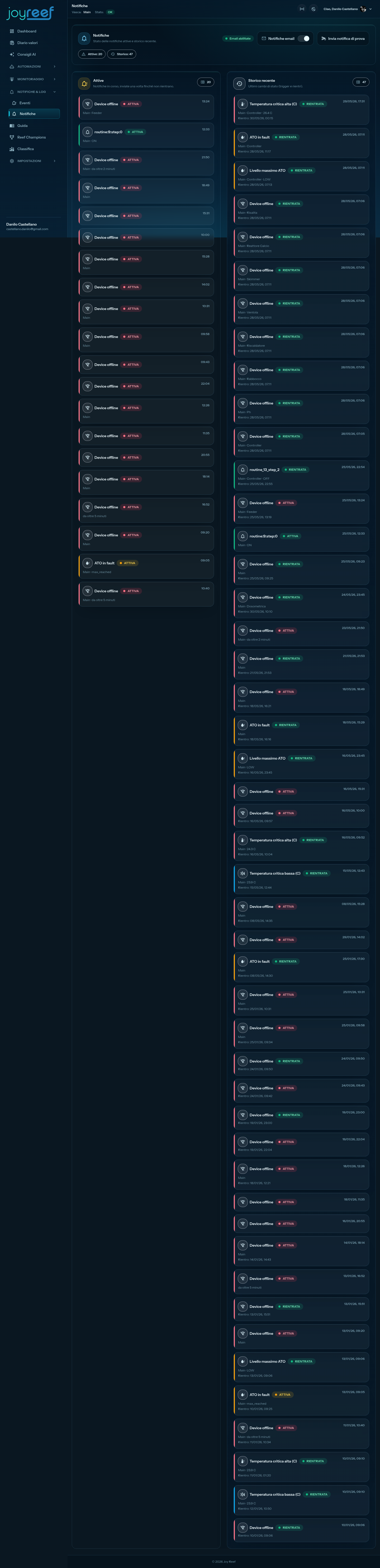
The "Notifications" page opens with:
- Header with title, subtitle + "Email enabled"/"Email disabled" status pill.
- "Email Notifications" toggle (on/off).
- Stats: "Active: X · History: Y."
- "Active" section with a list of ongoing notifications.
- "Recent History" section with a list of past state changes.
5. Step 1 — Activate emails
In the "Email Notifications" toggle at the top, click to activate it. It turns green.
You see a brief confirmation banner "Notifications enabled," and the pill at the top changes from "Email disabled" to "Email enabled."
From this moment on, every critical-level notification will arrive via email at your profile address.
💡 Immediate test: the simplest way to verify that emails arrive is to wait for the first real event. If you want to force a test, you can physically disconnect the return pump for 5 minutes (see guide 13 sec. 11 - recommended test). You receive the "Return pump stopped" email, you reconnect it, in a few minutes everything returns to normal and you receive (in history) the "cleared" confirmation.
6. Step 2 — Read the Active section
The "Active" section shows notifications currently ongoing: triggered events that have not yet cleared.
For each notification you see:
- Label of the event (e.g., "ATO in fault", "Return pump stopped").
- Status: 🟢 "Active."
- Timestamp of when it triggered.
💡 If the section is empty = "No active notifications." Good sign, everything is fine.
Active notifications cannot be "closed" manually: they clear automatically when the underlying condition is resolved (e.g., the return pump restarts, the ATO is reactivated, the device returns online). At that point, it disappears from Active and appears in History.
7. Step 3 — Read the History section
The "Recent History" section shows the last N state changes (both triggers and clearances).
For each entry you see:
- Label of the event.
- Status: 🟢 Active / ⚪ Cleared.
- Timestamp of the trigger.
- If cleared: "Cleared: HH:MM."
💡 Use history to: understand how frequently a certain problem occurs. Example: if "Skimmer stopped" appears 3 times in the last week, there is a systemic problem (recurring clogging, pump blocking due to poor maintenance, overflow).
8. Deactivating notifications
To deactivate:
- Go to /notifications.
- Click the "Email Notifications" toggle → it turns gray.
- Banner "Notifications disabled."
From this moment you will no longer receive emails, but events will still be recorded in /events (see guide 14). You can check them manually.
💡 When to deactivate temporarily: vacation where you are in an area without coverage, long tank maintenance (water change + cleaning + dosing pumps + etc.), initial setup test (to avoid receiving alerts while you are experimenting).
⚠️ Remember to reactivate them afterward. Deactivated notifications are the best way to miss a serious problem "because no one told me."
9. If something goes wrong
I activated emails but I don't receive any
Diagnose in order:
- Check the SPAM/Promotions folder of your email provider. Automatic emails typically end up there the first few times.
- Add
noreply@joy-reef.com(or the address they come from) to your contacts → mark as "Not spam" → in the future they will arrive in the main inbox. - Verify the profile email (User menu → Profile): it must be confirmed ("Email verified" badge). If not confirmed, resend the verification link.
- Check if there are actually critical events to notify: if the tank is perfect, there are simply no emails to send. Go to /events, "Errors" filter → if the list is empty, everything is fine!
- Email provider blocking/delaying: personal Gmail and Outlook always work. Some corporate emails (.edu, .gov, .corporate) have rigorous filters that block automatic emails → change to a personal address.
I receive too many emails
Probable cause: you have a recurring real problem. JoyReef emails don't "multiply" on their own — if you receive many for the same thing, it means the condition "triggers + clears + triggers + clears" multiple times.
- Go to /events, "Errors" filter, and identify the pattern.
- Resolve the underlying cause (e.g., clogged float sensor that oscillates).
- The emails will stop.
If the recurring event cannot be resolved quickly, consider maintenance mode (for energy/health, see guide 13) to silence alerts until you fix it.
The email is in the wrong language (English / Italian)
Notifications use the profile language. Verify in your profile that the language is "Italian" (or your preferred language) and not "English" (set by default for new accounts in some environments).
I want to forward emails to multiple people (e.g., spouse / client)
JoyReef sends to only one address (the profile one). To forward:
- Create a forwarding rule on your email client (Gmail, Outlook all have this function): "if the email comes from joy-reef.com → forward to XXX@yyy.com."
- Or use an email alias (mailgun, fastmail) that forwards to multiple people.
In a future version, we may add multi-recipient notifications natively.
I want to receive push notifications on my phone (not email)
Install the JoyReef app and log in: from that moment notifications also arrive as push, with nothing to configure. Push notifications are added to the email, they do not replace it: there is currently no way to receive only push and not email.
If push notifications do not arrive:
- make sure you logged in to the app (the device registers on login, not on installation alone);
- check that system notifications for the JoyReef app are enabled in your phone settings;
- remember that turning the "Email notifications" toggle off also blocks push.
10. Next step
You have active notifications. The tank now calls you when it needs you, instead of waiting for you to go check on it.
There are few other portal features left to document:
➡️ Guide 16 — Firmware Installation via USB (for those who want to update the controller or dosing pump firmware directly from the browser)
💡 Final tip for not living in anxiety: once notifications are activated, do not obsessively check the portal. If you receive an email → you look. If you don't receive one → the tank is fine. The /events page is there for the morning ritual check, but the true purpose of the system is not having to look at it.